

Whether you’re a solo content creator, a marketing team under deadline pressure, or a language educator working across borders, one problem keeps surfacing: your audio and video rarely stay perfectly in sync especially when you dub, translate, or repurpose content. Traditionally, fixing that meant expensive studios, skilled animators, or hours of painstaking frame-by-frame editing. Today, a new category of tool is rewriting that workflow entirely.
Why Lip Sync Has Always Been a Pain Point
Think about how much video content gets repurposed. A product demo recorded in English gets translated into Spanish for a Latin American market. A corporate training video gets updated with a new voiceover after a rebrand. A language tutor records a lesson but wants to add a professional audio track without re-filming.
In every one of these scenarios, the speaker’s mouth movements no longer match the audio, and audiences notice immediately. Studies on media perception consistently show that audio-visual misalignment breaks viewer trust and increases drop-off rates, sometimes by as much as 30–40% in educational or instructional video contexts.
The old solutions were either expensive (professional dubbing studios charge thousands per minute of finished video) or time-consuming (manual rotoscoping and animation can take a skilled editor 8–10 hours for a single minute of footage). For independent creators and small teams, neither option was realistic
What an AI Lip Sync Generator Actually Does
An AI lip sync generator uses computer vision and deep learning to analyze existing video footage frame by frame and then reshapes the mouth region of the on-screen speaker to match a new audio track. The result is a video where the speaker appears to be naturally saying whatever is in the audio file, even if the original recording was completely different.
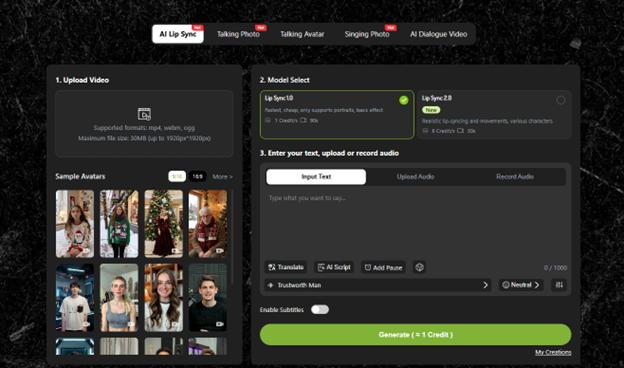
The most capable tools handle this end-to-end automatically. You upload your audio, you upload your video, and the AI does the rest no manual keyframing, no timeline editing, no technical expertise required.
What makes modern tools especially compelling is the breadth of input they accept.lipsync.video handles not just video-plus-audio combinations, but also single static images paired with an audio track meaning you can generate a fully lip-synced speaking animation from nothing more than a photograph and a voiceover file. A headshot becomes a spokesperson. A character illustration becomes a narrator. The creative possibilities extend well beyond the obvious use cases.
Real-World Scenarios Where This Changes Everything
Content Localization Without the Budget
A European SaaS company wants to launch a product explainer video in four languages simultaneously. Hiring four separate voice actors and re-filming four times is cost-prohibitive. With an AI lip sync video tool, the team records the video once in their native language, then generates localized audio tracks (via human translators or text-to-speech), and runs each audio file through the generator. The result: four distinct, lip-synced versions ready for regional campaigns at a fraction of the traditional cost.
Educational Content With a Personal Touch
An online educator has recorded 60 hours of course material. After updating the curriculum, roughly 12 hours of audio commentary need to be revised. Re-filming would mean booking studio time, re-doing makeup, re-scripting transitions a project that could easily take weeks. With an AI lip sync generator, the educator replaces only the audio, and the tool re-syncs the mouth movements to match. The visual continuity remains intact. Students notice nothing changed except the content itself.
Social Media Content From Static Assets
A small brand has a strong library of product photography but no video budget. Instead of shooting live footage, they select a brand ambassador photo, record a short 30-second promotional script, and run both through a lip sync generator. The output is a natural-looking video clip ready for Instagram Reels, TikTok, or YouTube Shorts generated entirely from a single image. This workflow, which would have required animation contractors or motion designers just a few years ago, now takes minutes.
How to Evaluate an AI Lip Sync Generator: What Actually Matters
Not all tools in this category perform equally. When assessing options, there are a few meaningful benchmarks worth examining:
Naturalness of mouth movement. The model should handle phoneme transitions smoothly the subtle shifts between sounds that make speech look organic. Choppy or overly rigid movement immediately signals a low-quality output.
Skin tone and lighting consistency. The area around the mouth gets modified; a good generator preserves the lighting, shadows, and texture of the surrounding face rather than creating a visible “patch” effect.
Hair and occlusion handling. When hair, hands, or objects partially obscure the mouth in the original footage, lesser models struggle. Robust tools handle these cases without visible artifacts.
Input flexibility. As noted, tools like the AI lip sync video generator at lipsync. video accepts both video and still-image inputs, which significantly expands the practical use cases without requiring users to have high-quality source footage.
Processing speed. For a tool to fit into a real production workflow, turnaround time matters. A generator that takes hours per minute of video creates bottlenecks; cloud-based tools that process in near-real time are meaningfully more useful.
The Broader Shift This Technology Represents
Lip sync technology is one piece of a larger movement: the reduction of production friction for video content. What once required a full post-production team dubbing artists, animators, sound engineers, editors can now be handled with a few file uploads and a few minutes of processing time.
This doesn’t replace creative vision. It removes the execution barriers that often stand between a good idea and a finished product. For creators working in multiple languages, for brands operating across markets, and for educators building scalable content libraries, that removal of friction is genuinely transformative.
The question for most teams today isn’t whether AI lip sync tools are ready for professional use they demonstrably are. The question is how quickly those teams adapt their workflows to take advantage of them.
If you’re ready to test what’s possible, uploading your first audio and video file takes less than a minute.
